Which Disney Are You Filter

2019AR filter / social media trenddead

Also known as: Which Disney Character Are You filter · Disney Character filter · Qué Princesa de Disney Eres

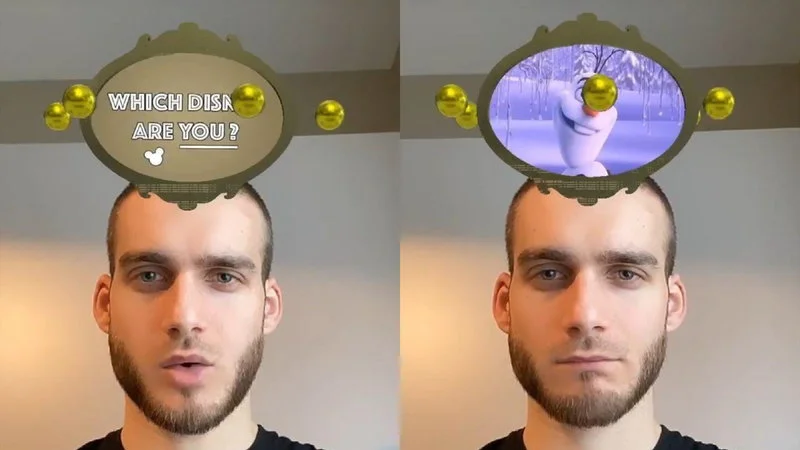
Which Disney Are You Filter is a 2019 Instagram augmented reality effect created by arnopartissimo that randomly assigns users a Disney character as a floating icon displayed above their head in selfie videos.

The "Which Disney Are You?" filter is a custom Instagram augmented reality effect that randomly assigns users a Disney character, displayed as a floating icon above their head during selfie videos. Created by Instagram user arnopartissimo in late December 2019, the filter spread rapidly across Instagram Stories and TikTok, drawing in celebrities and millions of everyday users during the holiday season. It became one of the defining viral moments of the Instagram filter craze that closed out 2019.

TL;DR

The "Which Disney Are You?" filter is a custom Instagram augmented reality effect that randomly assigns users a Disney character, displayed as a floating icon above their head during selfie videos.

Overview

The "Which Disney Are You?" filter is an Instagram augmented reality effect that works in selfie mode. When activated, a box appears above the user's head and cycles through a series of Disney character portraits before landing on one at random1. The result has nothing to do with the user's actual appearance or personality. As the New York Post put it, the results "seem as random as a spin of the wheel on Wheel of Fortune"1.

The filter includes 25 characters spanning Disney's catalog: Aladdin, Ariel, Banzai, Belle, Captain Hook, Cinderella, Dory, Elsa, Flounder, Genie, Gus, Hades, Hercules, Jafar, John Smith, Maleficent, Mulan, Olaf, Pumba, Quasimodo, Scar, Shere Khan, Simba, Timon, and Ursula4. The fun came not from accuracy but from the reactions people had to their randomly assigned character, especially when they got a villain or a sidekick instead of a hero.

Before December 19, 2019, Instagram user kevinsstorm uploaded a custom filter called "¿Qué princesa de Disney eres?" (Which Disney princess are you?), which randomly selected from a pool of Disney princesses and displayed the result as a floating icon over the user's head4.

On December 27, 2019, Instagram user arnopartissimo (Arno Partissimo) released a broader version titled "Which Disney Are You?" that expanded the character pool to 25 options, including heroes, villains, and sidekicks from across the Disney universe4. This version quickly overtook the original in popularity. Because both filters were third-party creations, they weren't automatically available in Instagram's default filter tray, which made finding them part of the experience3.

Origin & Background

Platform
Instagram (filter creation), Instagram Stories / TikTok (viral spread)
Key People
kevinsstorm, Arno Partissimo / arnopartissimo
Date
2019

Before December 19, 2019, Instagram user kevinsstorm uploaded a custom filter called "¿Qué princesa de Disney eres?" (Which Disney princess are you?), which randomly selected from a pool of Disney princesses and displayed the result as a floating icon over the user's head.

On December 27, 2019, Instagram user arnopartissimo (Arno Partissimo) released a broader version titled "Which Disney Are You?" that expanded the character pool to 25 options, including heroes, villains, and sidekicks from across the Disney universe. This version quickly overtook the original in popularity. Because both filters were third-party creations, they weren't automatically available in Instagram's default filter tray, which made finding them part of the experience.

How It Spread

The filter blew up during the last week of December 2019, right in the holiday dead zone when people were glued to their phones. Instagram Stories filled with friends showing off their Disney alter egos, and the trend jumped to TikTok, Facebook, and Snapchat almost immediately.

Celebrities helped fuel the spread. Musician Diplo, model Hailey Bieber, and actress Zelda Williams all tried the filter publicly. Broadway actor James Monroe Iglehart, who won a 2014 Tony Award for playing the Genie in Aladdin, also gave it a shot.

By December 30, 2019, major outlets were running explainers on how to find and use the filter. CNN published a guide walking readers through the process of locating the effect through a friend's story or through arnopartissimo's profile. Lifehacker noted that the Disney filter was part of a wave alongside similar "Which Pokemon Are You?" and "Which Harry Potter Are You?" filters, all made by third-party creators. The New York Post covered the trend with a roundup of user reactions, highlighting both delighted and horrified responses.

Much of the filter's virality came from the comedy of unwanted results. Twitter user @hannahroseknowz landed on Quasimodo and muttered "Are you f--king joking?" in her video. Instagrammer @charles_crispo_zulu tried three times before getting one of the warthogs from The Lion King and declared "That's so rude!". Others were thrilled: one user landed on Hercules while eating toast, and another celebrated getting Maleficent with "Yeessss, queen!".

The filter also spawned dozens of how-to guides on YouTube and blogs explaining three main methods for accessing it: searching "Which Disney" in Instagram's Browse Effects gallery, visiting arnopartissimo's profile directly, or tapping the filter name on a friend's story. The difficulty of finding the filter actually boosted engagement, as people shared it with friends who couldn't locate it on their own.

How to Use This Meme

Users typically followed these steps to try the filter:

1

Open Instagram and navigate to the Stories camera

2

Find the filter by searching "Which Disney" in the Browse Effects gallery, visiting @arnopartissimo's profile, or tapping the filter name on a friend's story

3

Switch to selfie mode (the filter requires a front-facing camera to detect the user's face)

4

Look straight at the camera and hold the record button to start a selfie video

5

The filter cycles through Disney characters in an oval above the user's head before landing on one

6

Share the result to Stories, often with a reaction to whichever character was assigned

Cultural Impact

The "Which Disney Are You?" filter arrived at a moment when Instagram's AR platform was maturing and third-party creators could build effects that rivaled official branded content. The filter's success demonstrated that user-made AR effects could go massively viral without any corporate backing or advertising budget.

The trend also helped establish the "character roulette" format as a social media staple. Similar filters for Pokemon, Harry Potter, and other franchises rode the same wave. The template of "spin a wheel above your head and react to the result" became a repeatable format that creators applied to dozens of other IPs and categories in the months that followed.

CNN, the New York Post, and Lifehacker all covered the filter within days of its peak spread, making it one of the last major viral trends of 2019.

Fun Facts

The filter includes Shere Khan listed as being from "Mowgli" rather than The Jungle Book, which is technically the character's origin story name.

Maleficent is labeled as being from Snow White in the filter's character list, even though the character is actually from Sleeping Beauty.

James Monroe Iglehart, a Tony-winning actor who played the Genie on Broadway, tried the filter but apparently did not land on Genie.

The filter only works in selfie mode. Pointing the camera outward produces no effect.

Derivatives & Variations

"¿Qué Princesa de Disney Eres?"

— The original Disney princess-only version by kevinsstorm that predated arnopartissimo's broader filter[4].

"Which Pokemon Are You?" filter

— A similar third-party character roulette filter that spread alongside the Disney version[3].

"Which Harry Potter Are You?" filter

— Another character assignment filter that gained traction during the same late-December 2019 wave[3].

Frequently Asked Questions

WhichDisneyAreYouFilter

2019AR filter / social media trenddead

Also known as: Which Disney Character Are You filter · Disney Character filter · Qué Princesa de Disney Eres

Which Disney Are You Filter is a 2019 Instagram augmented reality effect created by arnopartissimo that randomly assigns users a Disney character as a floating icon displayed above their head in selfie videos.

The "Which Disney Are You?" filter is a custom Instagram augmented reality effect that randomly assigns users a Disney character, displayed as a floating icon above their head during selfie videos. Created by Instagram user arnopartissimo in late December 2019, the filter spread rapidly across Instagram Stories and TikTok, drawing in celebrities and millions of everyday users during the holiday season. It became one of the defining viral moments of the Instagram filter craze that closed out 2019.

TL;DR

The "Which Disney Are You?" filter is a custom Instagram augmented reality effect that randomly assigns users a Disney character, displayed as a floating icon above their head during selfie videos.

Overview

The "Which Disney Are You?" filter is an Instagram augmented reality effect that works in selfie mode. When activated, a box appears above the user's head and cycles through a series of Disney character portraits before landing on one at random. The result has nothing to do with the user's actual appearance or personality. As the New York Post put it, the results "seem as random as a spin of the wheel on Wheel of Fortune".

The filter includes 25 characters spanning Disney's catalog: Aladdin, Ariel, Banzai, Belle, Captain Hook, Cinderella, Dory, Elsa, Flounder, Genie, Gus, Hades, Hercules, Jafar, John Smith, Maleficent, Mulan, Olaf, Pumba, Quasimodo, Scar, Shere Khan, Simba, Timon, and Ursula. The fun came not from accuracy but from the reactions people had to their randomly assigned character, especially when they got a villain or a sidekick instead of a hero.

Before December 19, 2019, Instagram user kevinsstorm uploaded a custom filter called "¿Qué princesa de Disney eres?" (Which Disney princess are you?), which randomly selected from a pool of Disney princesses and displayed the result as a floating icon over the user's head.

On December 27, 2019, Instagram user arnopartissimo (Arno Partissimo) released a broader version titled "Which Disney Are You?" that expanded the character pool to 25 options, including heroes, villains, and sidekicks from across the Disney universe. This version quickly overtook the original in popularity. Because both filters were third-party creations, they weren't automatically available in Instagram's default filter tray, which made finding them part of the experience.

Origin & Background

Platform
Instagram (filter creation), Instagram Stories / TikTok (viral spread)
Key People
kevinsstorm, Arno Partissimo / arnopartissimo
Date
2019

Before December 19, 2019, Instagram user kevinsstorm uploaded a custom filter called "¿Qué princesa de Disney eres?" (Which Disney princess are you?), which randomly selected from a pool of Disney princesses and displayed the result as a floating icon over the user's head.

On December 27, 2019, Instagram user arnopartissimo (Arno Partissimo) released a broader version titled "Which Disney Are You?" that expanded the character pool to 25 options, including heroes, villains, and sidekicks from across the Disney universe. This version quickly overtook the original in popularity. Because both filters were third-party creations, they weren't automatically available in Instagram's default filter tray, which made finding them part of the experience.

How It Spread

The filter blew up during the last week of December 2019, right in the holiday dead zone when people were glued to their phones. Instagram Stories filled with friends showing off their Disney alter egos, and the trend jumped to TikTok, Facebook, and Snapchat almost immediately.

Celebrities helped fuel the spread. Musician Diplo, model Hailey Bieber, and actress Zelda Williams all tried the filter publicly. Broadway actor James Monroe Iglehart, who won a 2014 Tony Award for playing the Genie in Aladdin, also gave it a shot.

By December 30, 2019, major outlets were running explainers on how to find and use the filter. CNN published a guide walking readers through the process of locating the effect through a friend's story or through arnopartissimo's profile. Lifehacker noted that the Disney filter was part of a wave alongside similar "Which Pokemon Are You?" and "Which Harry Potter Are You?" filters, all made by third-party creators. The New York Post covered the trend with a roundup of user reactions, highlighting both delighted and horrified responses.

Much of the filter's virality came from the comedy of unwanted results. Twitter user @hannahroseknowz landed on Quasimodo and muttered "Are you f--king joking?" in her video. Instagrammer @charles_crispo_zulu tried three times before getting one of the warthogs from The Lion King and declared "That's so rude!". Others were thrilled: one user landed on Hercules while eating toast, and another celebrated getting Maleficent with "Yeessss, queen!".

The filter also spawned dozens of how-to guides on YouTube and blogs explaining three main methods for accessing it: searching "Which Disney" in Instagram's Browse Effects gallery, visiting arnopartissimo's profile directly, or tapping the filter name on a friend's story. The difficulty of finding the filter actually boosted engagement, as people shared it with friends who couldn't locate it on their own.

How to Use This Meme

Users typically followed these steps to try the filter:

1

Open Instagram and navigate to the Stories camera

2

Find the filter by searching "Which Disney" in the Browse Effects gallery, visiting @arnopartissimo's profile, or tapping the filter name on a friend's story

3

Switch to selfie mode (the filter requires a front-facing camera to detect the user's face)

4

Look straight at the camera and hold the record button to start a selfie video

5

The filter cycles through Disney characters in an oval above the user's head before landing on one

6

Share the result to Stories, often with a reaction to whichever character was assigned

Cultural Impact

The "Which Disney Are You?" filter arrived at a moment when Instagram's AR platform was maturing and third-party creators could build effects that rivaled official branded content. The filter's success demonstrated that user-made AR effects could go massively viral without any corporate backing or advertising budget.

The trend also helped establish the "character roulette" format as a social media staple. Similar filters for Pokemon, Harry Potter, and other franchises rode the same wave. The template of "spin a wheel above your head and react to the result" became a repeatable format that creators applied to dozens of other IPs and categories in the months that followed.

CNN, the New York Post, and Lifehacker all covered the filter within days of its peak spread, making it one of the last major viral trends of 2019.

Fun Facts

The filter includes Shere Khan listed as being from "Mowgli" rather than The Jungle Book, which is technically the character's origin story name.

Maleficent is labeled as being from Snow White in the filter's character list, even though the character is actually from Sleeping Beauty.

James Monroe Iglehart, a Tony-winning actor who played the Genie on Broadway, tried the filter but apparently did not land on Genie.

The filter only works in selfie mode. Pointing the camera outward produces no effect.

Derivatives & Variations

"¿Qué Princesa de Disney Eres?"

— The original Disney princess-only version by kevinsstorm that predated arnopartissimo's broader filter[4].

"Which Pokemon Are You?" filter

— A similar third-party character roulette filter that spread alongside the Disney version[3].

"Which Harry Potter Are You?" filter

— Another character assignment filter that gained traction during the same late-December 2019 wave[3].

Frequently Asked Questions